Recording Rewards Points on an Order
Use Add Reward in Maintain Order to record the customer's Resale Rewards points for an order. Applicable points are calculated when the sale is completed.
Note: Add Reward appears in the Coupons section, but recording points is different from redeeming a coupon. It does not apply a discount, reduce the order total, or refund a payment.
Before You Begin
- Confirm that your store uses Resale Rewards and that its connection is configured.
- Have the phone number associated with the customer's rewards account.
- Locate the correct order and review its payment and completion status.
- For an order already downloaded from Shopify, use the existing order. Do not create a duplicate sale.
Warning: Some imported orders display the message, “Making changes to this order will prevent any further web updates. Do you want to continue?” Review the consequences before proceeding. Contact Resaleworld Support if you are unsure whether the order should be edited.
Record the Customer's Rewards Account
- Open Liberty Listing Manager and select the Orders tab.
- Select the existing order and click Update Order. If you are creating a new order, click New Order instead.
Note: Marker 2 in the image identifies New Order. For an existing sale, use Update Order, directly below it.

- In Maintain Order, select Details, then click Add Reward in the Coupons section.

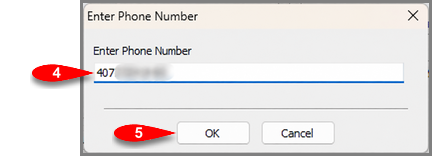
- If Enter Phone Number appears, enter the phone number associated with the customer's rewards account.
- Click OK to continue, or Cancel to stop the lookup.
Complete the Order Normally
Continue the order's normal processing and completion workflow. Selecting Add Reward or completing the phone lookup does not complete the sale. Applicable points are calculated when the sale is completed.
Do not mark an order complete before it is ready just to trigger rewards points.
Orders Already Paid Through Shopify
If Shopify has already collected payment, Add Reward is used to record points earned from the sale. You do not need to issue a partial refund to use this feature. Recording points does not apply a reward coupon to the Shopify order or change the payment already collected.
If You Need Help
If the account cannot be found, confirm the phone number with the customer and check your store's Resale Rewards connection. Do not substitute another customer's number.
If the lookup fails or points are missing after the sale is completed, contact Resaleworld Support with the order number, completion status, and any displayed error message.
Next Article In Section
Click the following link to move to the next article in this section:
Adding A Payment To An Order
Related Topics
Recording Rewards Points on an Order Maintaining An Order Overview Changing The Marketplace/Site Of A Manual Order Change Order Status View Pending Orders Adding An Item To An Order Adding A Fee To An Order Removing An Item Or Fee From An Order Updating Unsellable Items On An Order Adding A Coupon To An Order Removing A Coupon From An Order Adding A Payment To An Order Removing A Payment From An Order Totals Area Of An Order Adding A Note To An Order Marking An Order As Complete To make Items Ready For Payment Changing The Terminal ID Of An Order Printing An Invoice For An Order Emailing An Invoice To A Customer