Table of Contents
ACH Eligibility and Initial Setup
ResaleWallet lets eligible Liberty Cloud stores send consignor payouts to a bank account by ACH. Before using it, your store must be enabled for ResaleWallet and complete the store and bank setup.
Is My Store Eligible?
ResaleWallet is available to eligible Liberty Cloud customers running Liberty 6.4b as part of a controlled rollout. Contact Resaleworld Support at 800 785 4800 to confirm availability and arrange setup.
Note: Having a ResaleWallet menu in Liberty does not by itself mean that your store is ready to send payments. Support must enable the service, and the required verification must be completed.
Complete The Initial Setup
- In the Inventory Module, select Setup.
- Select ResaleWallet.
- Select Edit Profile Information…. Complete your store's business profile and any required verification. See Set Up Your Business Entity for the full instructions.
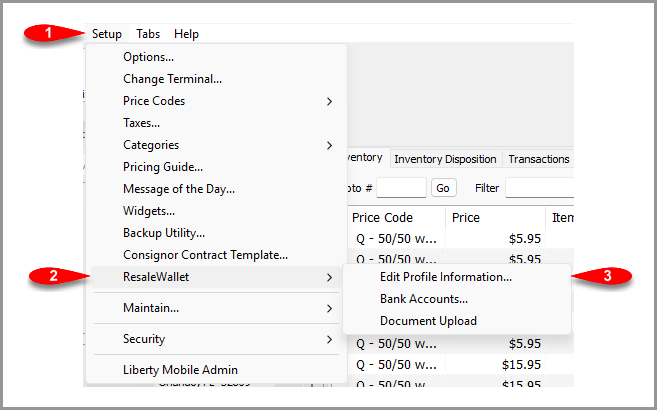 Open the ResaleWallet store profile from the Setup menu.
- After the profile is accepted, return to Setup > ResaleWallet and select Bank Accounts…. Add and verify the store account that will fund the payouts. See Add A Bank Account for the entry and verification steps.
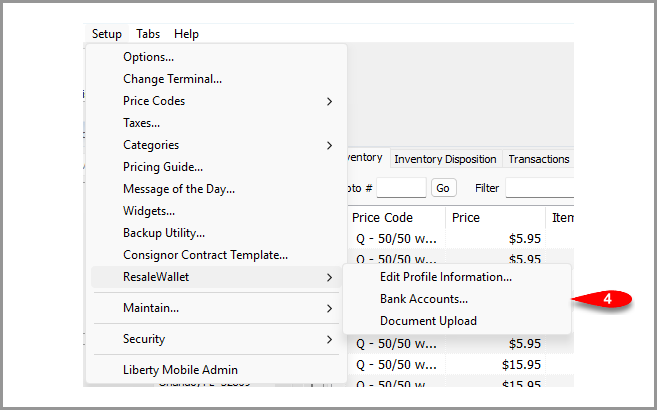 Use Bank Accounts to connect and verify your store's funding account.
- Prepare each consignor's account. Confirm that Digital Payout ID uses the email address the consignor wants to use for ResaleWallet. Select the appropriate ResaleWallet Payment Account for future payouts and save any changes. See Required Consignor Fields.
- Use Set Up ResaleWallet Before A Payout to send the consignor's setup email without creating a payment. The consignor completes their own registration and banking details through the secure setup pages.
When Is The Store Ready To Pay?
Before preparing a ResaleWallet payout, confirm that the store profile has been accepted and the funding bank account is active and verified. Check the consignor's Digital Payout ID and the selected Payment Account as well.
Setting up consignors in advance is an option. Sending the setup email does not confirm that their registration or bank verification is finished. They may still need to complete setup before funds can reach their bank account. For the payout steps, use the single consignor payout guide or the mass payout guide.
Next Article In Section
Click the following link to move to the next article in this section:
Set Up ResaleWallet Before A Payout